
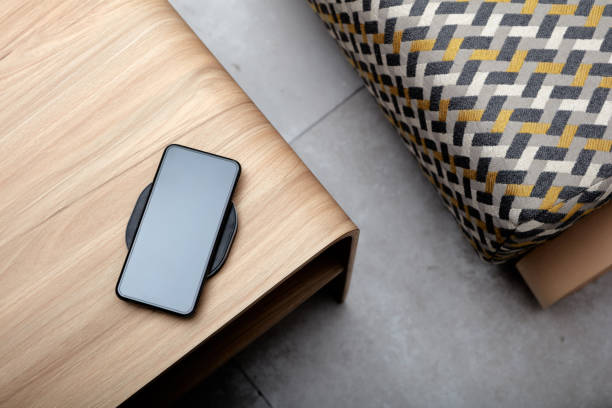
Wireless charging has become a useful feature for home offices, professional workstations and modern furniture. Smartphones are often kept beside a computer throughout the working day, making convenient access to power an important part of an organised desk setup. Instead of keeping a charging pad and cable on the desktop, wireless charging can be integrated directly into the furniture.
One common question is: Can a wireless charger actually charge a phone through a wooden desk? The short answer is yes, wireless charging can work through suitable wood and other non-metallic surfaces when the charging system is designed for the required installation distance.
A concealed desk wireless charger can be installed underneath a wooden surface, allowing a compatible phone to charge while the charging hardware remains out of sight. This can help create a cleaner workspace while reducing visible accessories and cables.
However, not every wooden desk will work with every charger. Surface thickness, construction, charging distance, Qi compatibility, phone cases and installation quality can all affect performance. Understanding these factors can help you choose and install a suitable solution.
How Does Wireless Charging Work Through Wood?
Wireless charging works by transferring electrical energy between a transmitter in the charging unit and a receiving coil inside a compatible device. Unlike wired charging, the phone does not need to be physically connected to the charger with a charging cable.
Wood itself does not normally prevent this type of energy transfer because it is a non-metallic material. This makes suitable wooden surfaces a practical option for integrated wireless charging.
The important consideration is the distance between the charging transmitter and the phone’s receiving coil. If the desk is too thick or other materials are positioned between the two components, charging performance can be reduced.
The Basic Technology
A wireless charging module creates an electromagnetic field that can transfer energy to a compatible receiving coil inside a smartphone. When the phone is positioned correctly above the charging area, the two systems communicate and power can be transferred.
For an under-desk installation, the charging module sits beneath the wooden surface while the smartphone rests directly above the charging zone. The user does not need to see or touch the charging hardware.
This approach makes it possible to integrate charging into furniture rather than treating a charging pad as a separate desktop accessory.
Does Every Wooden Desk Work?
Not necessarily. Whether a particular desk can support wireless charging depends on the charging system, surface thickness and construction.
Solid wood, plywood, MDF and laminate-covered wooden surfaces may all be suitable in certain installations, but their thickness need to be considered.
Metal components also require particular attention. Metal reinforcement, brackets or other conductive materials positioned directly between the charger and smartphone interfere with wireless charging, but just nearby is no issue to charging.
For this reason, it is important to follow the specific manufacturer’s technical requirements rather than assuming that any wireless charger will work through any wooden desk.
What Wood Thickness Is Best for a Desk Wireless Charger?
Thickness is one of the most important factors when installing wireless charging beneath furniture. The greater the distance between the transmitter and the phone, the more difficult it can be for the system to deliver reliable charging.
The relevant measurement is not simply the advertised thickness of the desk. You need to consider the actual distance between the charging module and the phone, including any veneer, laminate, finish or phone case.
Why Thickness Matters
Wireless charging relies on relatively close proximity between the transmitter and receiving coil. If the charging unit is mounted too far below the surface, the phone may fail to charge or may charge less effectively.
The phone case also matters. A thick protective case adds another layer between the receiving coil and the charging transmitter. This can be particularly relevant when an installation is already close to the maximum recommended distance.
Some cheaper wireless charging systems that are hidden require the phone to be extremely close to the surface, which can make installation haphazard. This is usually because they’re not optimised for modern MagSafe and camera module thicknesses seen in phones today. This is why it’s important to consider the power profile and the communication technology used in any hidden wireless charging
For this reason, choosing the correct charger for the intended furniture thickness is essential.
Checking Your Desk Before Installation
Before modifying a wooden desk, measure the exact area where the charger will be positioned. Do not rely only on the manufacturer’s advertised desk thickness because construction can vary across different areas of the furniture.
Check whether the surface includes veneers, laminates, reinforcement materials or other components that may change the effective distance.
It is also useful to test the charger through the actual material rather than a similar sample. This can help confirm charging performance before you permanently install the module.
Kew Labs UTS-2 Thickness Requirements
Kew Labs’ standard UTS-2 documentation specifies an effective installation range of 8 to 12 mm for the relevant non-metallic surface configuration. This means the charging module needs to be positioned at the appropriate distance from the device.
If the wooden desk is thicker than the specified installation range, the underside may need to be routed or thinned to achieve the required distance. This is particularly relevant for furniture makers and DIY users working with thicker timber. If routing is required, Kew Labs recommends going down to 8mm for higher efficiency.
Kew Labs also provides product variations and technical information for different installation requirements, so the appropriate specifications should be reviewed before modifying furniture.
How to Install a Wireless Charger Under a Wooden Desk
Installing a wireless charger beneath a wooden desk can be approached in several ways. The most suitable option depends on the furniture construction, available space and specifications of the selected charging module.
Under-Surface Installation
The simplest integrated approach is to mount the charging unit underneath the desk surface. The charger is positioned directly below the location where the phone will normally be placed.
The module should be secured according to the manufacturer’s instructions and connected to its appropriate power source. The power cable can then be routed towards the rear or underside of the desk.
This approach can work particularly well when the desk already has a suitable surface thickness and accessible underside.
Recessed Installation
A recessed installation can be useful when a wooden desk is thicker than the charger’s recommended distance. A shallow section can be routed or machined into the underside of the desk so that the charging module sits closer to the surface.
This technique can be suitable for DIY projects and professional woodworking applications where the underside of the furniture can be modified.
Careful measurement is important because removing too much material can weaken the furniture or result in an unsuitable charging distance. Testing should be completed before the final surface treatment or permanent installation.
Planning the Charging Position
The charging location should be convenient for everyday use. Think about where your phone naturally sits while you work and avoid areas that are frequently covered by laptops, monitor stands, notebooks or other equipment.
A subtle symbol, sticker, inlay or other visual indicator can identify the charging area. This is particularly useful when the charger itself is completely hidden beneath the desk.
Before finalising the position, place the phone above the intended area and check whether alignment feels natural.
Qi Compatibility and Charging Performance Through Wood
The ability to charge through wood is only one part of choosing a suitable system. The charger must also be compatible with the devices you intend to charge.
Does Qi Charging Work Through Wood?
Qi is a widely used wireless charging standard that allows compatible devices and chargers to work together. A desk wireless charger should support the charging standard and protocols required by the smartphones or other devices being used.
Compatibility with Qi is separate from the physical ability to transmit power through a wooden surface. A charger may support Qi but still have specific surface thickness and installation requirements.
Kew Labs’ UTS-2 is designed for Qi-compatible devices and provides specifications for integrated installation beneath suitable non-metallic surfaces.
What Can Affect Charging Performance?
Several factors can influence how effectively wireless charging works through a desk:
Surface thickness and construction
Phone case thickness
Device positioning and alignment
Metal components between the charger and device
Charger specifications, communication technology between charger and phone and power supply
Installation distance and surface preparation on the underside
Testing the complete setup with the actual phone and furniture is therefore important before completing a permanent installation.
Charging Speed vs. Convenience
A hidden charger may involve a balance between charging performance, installation requirements and convenience. A conventional charging pad positioned directly against the phone may have a different performance profile from an under-surface solution.
The highest possible power output is not necessarily the only consideration. For a desk installation, ease of use, compatibility, appearance and reliable everyday charging may be equally important.
Kew Labs lists the UTS-2 with up to 20W maximum output and support for Qi-compatible devices, along with Apple and Samsung charging protocols.
Why Add Wireless Charging to a Wooden Desk?
Integrating charging into wooden furniture can provide practical benefits beyond simply powering a smartphone. It can also change how the desk looks and how efficiently the workspace is used.
A Cleaner Workspace
A conventional charging pad occupies part of the desktop and usually requires a visible cable. An integrated charger moves the main charging hardware underneath the desk.
This can reduce visible clutter and leave more of the working surface available for computers, notebooks and other equipment.
For minimalist home offices and professional workspaces, this can create a more streamlined appearance.
Better Furniture Integration
Wireless charging can become a built-in furniture feature rather than an accessory added after the desk has been completed.
This is particularly useful for custom desks, office furniture, conference tables and bespoke woodworking projects. A wooden wireless charging station can be designed around the furniture instead of being placed on top of it.
Furniture makers can also consider charging locations alongside cable management, power access and the overall desk layout.
Convenience for Everyday Use
Once installed correctly, charging can become a simple part of the normal working routine. A compatible smartphone can be placed over the charging area without searching for a cable or connecting a plug.
This can be particularly useful for people who regularly use a smartphone alongside a desktop computer or laptop.
Kew Labs highlights wireless charging applications for custom woodworking and DIY projects, including furniture and desk applications.
Choosing the Right Wood Wireless Charger
Choosing a suitable charger involves more than checking the advertised power output. The product must match the physical construction of the desk as well as the devices being charged.
Consider the following factors before purchasing:
Required surface thickness and charging distance
Compatibility with wood and other non-metallic materials
Qi compatibility and supported devices
Charging output and supported charging protocols
Installation and routing requirements
Power connection and cable management
Safety features and relevant certifications
For professional furniture projects, technical drawings and installation documentation can also be valuable because they allow the charger to be incorporated accurately during manufacturing.
Recommended Solution: Kew Labs UTS-2
The Kew Labs UTS-2 is a purpose-built hidden wireless charger designed for integration beneath suitable non-metallic surfaces. Kew Labs lists materials including wood, stone, plastic and glass among its compatible surfaces, subject to the relevant installation requirements.
The UTS-2 has a compact design and uses USB-C power. Its standard specification provides an effective charging distance of 8 to 12 mm, making accurate surface preparation important for wooden desk installations.
For anyone looking for a purpose-built wood wireless charger rather than modifying a standard charging pad, the Kew Labs UTS-2 provides technical information and installation guidance for integrated furniture applications.
Common Mistakes to Avoid
Hidden charging can provide a clean result, but installation mistakes can reduce charging performance or make the system difficult to use.
Some of the most common mistakes include:
Installing a charger through a surface that exceeds its specified charging distance.
Measuring the general desk thickness rather than the exact installation area.
Ignoring metal components positioned between the charger and phone.
Failing to test the charger before permanently modifying the furniture.
Choosing a charging location that is difficult to reach or align with.
Assuming every Qi charger is designed for charging through furniture or going with the cheapest devices which are not usually optimised for longer distance charging or newer phones with MagSafe and large camera modules which adds charging complexity.
Forgetting to plan power access and cable routing.
It is also important to follow the manufacturer’s installation instructions when modifying a desk. Proper surface preparation, positioning and power planning can make a significant difference to the final result.
Conclusion
A desk wireless charger can charge compatible devices through suitable wooden surfaces when the charger, material and installation distance are correctly matched. The key factors include surface thickness, material compatibility, Qi support, device positioning, phone case thickness and installation quality. Integrating a charger beneath a wooden desk can create a cleaner workspace while keeping the charging hardware out of sight, making it suitable for home offices, professional workstations and custom furniture. DIY users and furniture makers should carefully measure and test the intended installation area before making permanent modifications. For a purpose-built option, the Kew Labs UTS-2 provides a solution designed for installation beneath compatible non-metallic surfaces and offers defined technical requirements for planning an integrated charging setup.
If you are planning a wooden desk charging project and need an integrated wireless charging solution, contact us today to discuss your furniture and charging requirements.
FAQs
Yes. Wireless charging can work through suitable wood because wireless power transfer can pass through non-metallic surfaces. However, the surface thickness and the charger’s specified charging distance must be suitable for the installation.
There is no universal thickness because different chargers have different operating distances. Kew Labs’ standard UTS-2 documentation specifies an effective installation range of 8 to 12 mm for its relevant configuration. Always check the specifications of the charger you choose.
The important consideration is generally the total distance between the charging module and the phone rather than whether the desk is made from oak, walnut, pine or another wood. However, the construction, finish and thickness of the specific surface should still be checked.
Yes, compatible wireless charging systems can work through suitable non-metallic engineered wood products such as MDF or plywood when the total thickness and other installation requirements are within the charger’s specifications.
A thick surface can prevent a particular charger from working effectively if the distance exceeds its specified range. Depending on the product, the underside of the desk may need to be routed or thinned to position the charger at the appropriate distance.
Depending on the desk’s construction, an under-surface installation may be possible. Check the material, thickness, underside accessibility and charger requirements before modifying the furniture. Testing the installation before permanent fixing is recommended.
Yes. A thick phone case increases the distance between the phone’s receiving coil and the charging module. This can affect charging performance when the charger is already operating close to its maximum effective distance.
A wooden wireless charging station is a charging setup integrated into or beneath wooden furniture. It allows compatible devices to receive power without requiring a conventional charging pad to remain visible on the desk surface.
It depends on the user’s priorities. A hidden solution can provide a cleaner appearance and better furniture integration, while a conventional charging pad is generally easier to install, reposition and replace.
Check the charger’s required surface thickness, material compatibility, Qi support, charging output, device compatibility, installation method, power requirements and technical guidance. For furniture integration, also consider cable routing and access for future maintenance.