
Installation and Design resources
Useful Video Link
Kew Labs Youtube Channel
FAQs and Help Center
FAQ Install Help Center
Dealer Training Portal
Access Sales and Marketing Material
Downloads
Drawing Downloads
Start designing and planning for an installation with our complete drawings and technical datasheets
UTS-2 Routing Diagram - PDF + DXF
Best option to share with your fabricator or general contractor
Surface Brand Approvals - Cosentino, Neolith, Laminam etc
Kew Labs has worked directly with the world’s leading surface countertop brands to test and and approve our specification and technology so you can install with confidence and safety.
Cosentino – Approval and Specification Sheet (EN)
Cosentino – Approval and Specification Sheet (ES)
Laminam – Approval and Specification Sheet
Neolith – Approval and Specification Sheet (EN)
Neolith – Approval and Specification Sheet (ES)
Tristone – Approval and Specification Sheet
Multi-Charger Connection and Wiring Diagram
UT2-2 can be series connected using USB-C power hubs. Kew Labs officially recommend Satechi 4 and 6 port hubs to connect multiple chargers together.
USB-C cables can be extended up to 4.5m (~15ft) and reduced to 1m (~3ft) for wiring a multi-charger install.
UTS-2 wiring and series connection diagram
Bar top 6 Charger Installation
Meeting table 6 Charger installation
Satechi – Buy on Amazon (USA)
check list
Before any installation please ensure:
- Your surface is between our 8-12mm (0.31-0.5″) thickness specification
- If you have a phone case, check it is flat and does not contain any metal, centrally located magnets, card holders, pop sockets, kickstands
- The surface you are mounting the charger is non-metallic, clean and flat.
- The installation area is within 1.5m (4′ 11″) of your power outlet. (if you require an extension cable, USB-C cable up to 5m (16′ 4″) can be used and are sold separately)
installation Guides
Wireless charging countertop Installation Example
A step by guide that can be applied to all UTS-2 installations – in this example it’s a 3cm quartz countertop
Fabricators Video
Stone Fabrication Example
Kew Labs has built on feedback of previous product working directly with fabricators on UTS-2 to develop a charger that is quicker and safer to fabricate compared to competitor solutions.
Recommended Tooling – Diamond Tipped routing bit
Installation planning
Connect multiple chargers
a larger UTS-2 installation requiring multiple UTS-2 chargers can easily be connected together using USB-C power hubs systems (sold separately).
Each unit requires a minimum 12V 1.67A (20W) output to function correctly.
For example – connecting 3 chargers to a power hub would a require a minimum 60W USB-C power hub with each port having at least 20W USB-C power.

Kew Labs officially endorses Satechi power hubs to connect 2 , 3, 4 or 6 UTS-2 to one power supply.
Our USB-C power hub recommendations for connecting multiple UTS-2 together
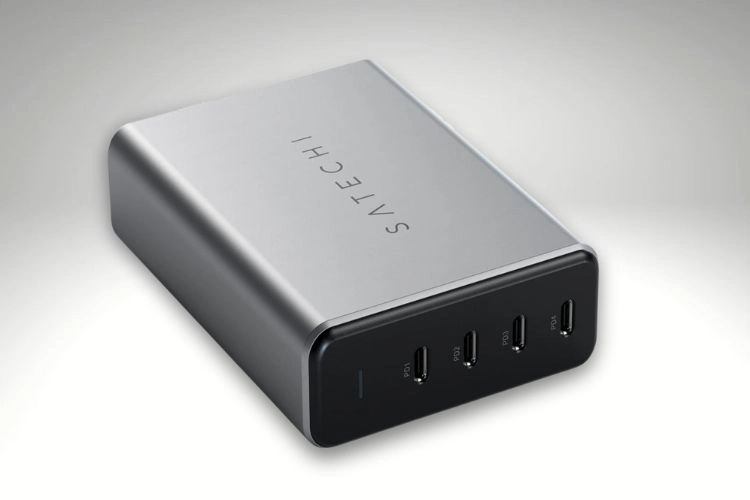
Connect up to 4 units
Perfect for bars, larger office installs and more
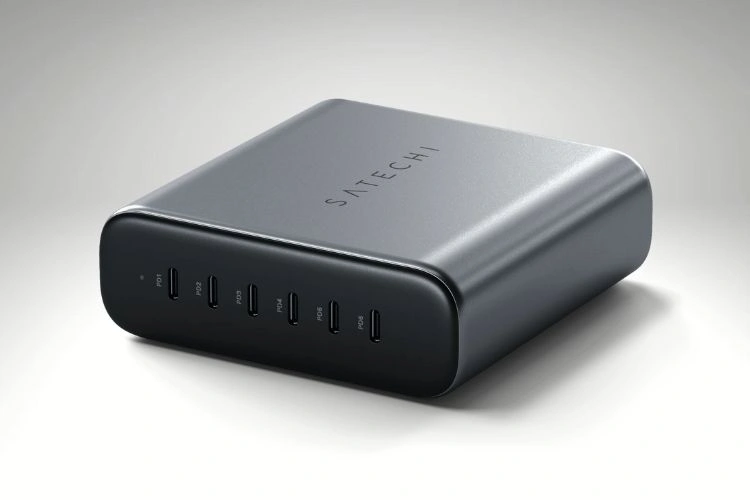
Connect up to 6 units
Ideal for the biggest installs like a conference room table or open plan offices or long bar tops
How to connect 6 chargers to one outlet
Perfect for long bar tops and meeting room tables. Connect up to 6 chargers off one power hub.